.svg)

1911 N Fort Myer Drive, Suite 1100
Arlington, VA 22209
866-568-0590
info@clearpointstrategy.com
Every answer cites its source. Every change is permission-checked and audited. ClearPoint AI is not trained on customer data.
 Leader in Strategic Planning & Execution · G2 Fall 2026












Because the people who own the work rarely open the tool. ClearPoint AI goes to them instead.
ClearPoint AI is the AI inside ClearPoint’s strategic planning software. It reads a plain-English request from email, Microsoft Teams, Outlook or your own assistant over the MCP Server, reasons over your plan, and writes a governed, permission-aware update back to the scorecard.
New to ClearPoint? See the strategy execution platform ›Five jobs, one governed loop. It reaches the people who own the work, briefs leaders, grounds every answer in your documents, guides the analysis and turns it into owned action.
The people whose input you need most are the least likely to open another tool. ClearPoint AI reaches them in email and Teams, and your own assistant connects over the MCP Server.
Over MCP, Claude, ChatGPT or Microsoft Copilot can also build: scorecard hierarchies, custom fields, measure data and calculated series such as variance-to-target.
My AI Briefing rebuilds from live account data every time it opens. Executives get a Strategy Brief with a recommended focus and the questions worth asking. Contributors get a checklist of what needs their update. Administrators see adoption signals across the account.
Upload your strategic plan, a board paper or a policy document, or connect OneDrive, Google Drive or Slack. ClearPoint AI answers from that context and cites where each answer came from.
Playbooks are structured, multi-step conversations: SWOT, risk assessment, year-over-year comparison, correlation analysis, account rollovers and OKR builds. Type “create a scorecard” and the right playbook opens on its own.
ClearPoint AI writes the performance analysis and recommends next steps on any element, from what is actually in the plan. One click turns a recommendation into an action item with status, type and owner already set.
Yes. The ClearPoint MCP Server connects the assistant you already use to your plan. It signs in with OAuth and sees only what you are allowed to see.
 Claude
 ChatGPT
 Microsoft Copilot
Search the plan and get answers: what is at risk, who owns it, what changed.
Create scorecards, objectives, measures, initiatives and calculated series.
Write measure data and status updates back, in batches.
Any MCP-compatible assistant can connect to your plan. ClearPoint AI also works inside the apps your team already uses.
 Microsoft Teams
 Outlook
 OneDrive
 Google Drive
 Slack
SlackSame meeting, different week. The numbers are current by Monday night and the pre-read lands on Wednesday afternoon.
Watch the tour, then look closer at the screens owners use most. Every element it creates is confirmed back to you before it lands.
Video: ClearPoint AI building, analyzing and updating a live strategic plan.
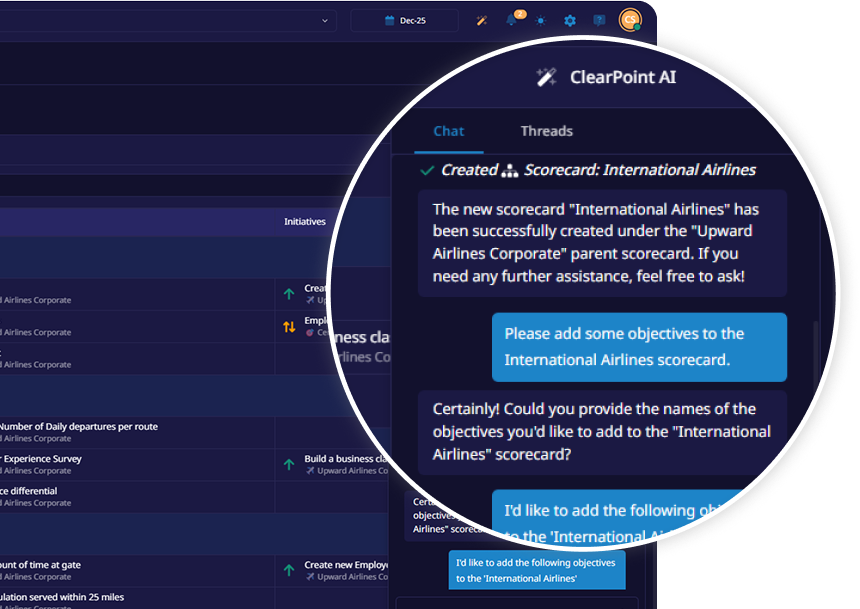
Ask in plain English for a scorecard, objectives or measures. It suggests measures and initiatives that fit your framework, Balanced Scorecard or OKRs, and confirms each element before it lands.
Open any measure and the Analyze Data panel explains the variance, drafts the analysis and suggests what to do next.
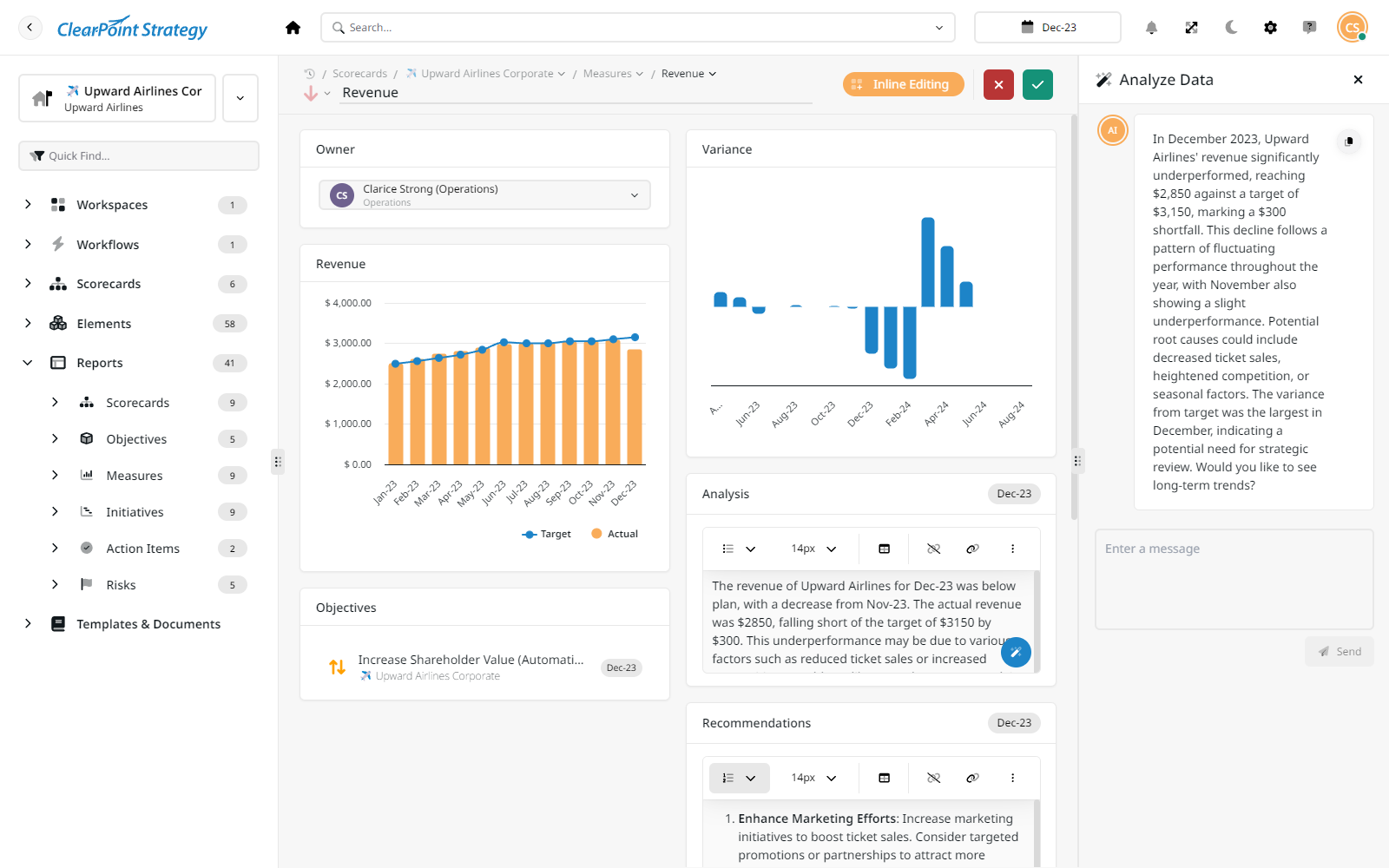
Analysis and recommendations sit side by side on the element. One click turns a recommendation into an owned action item.
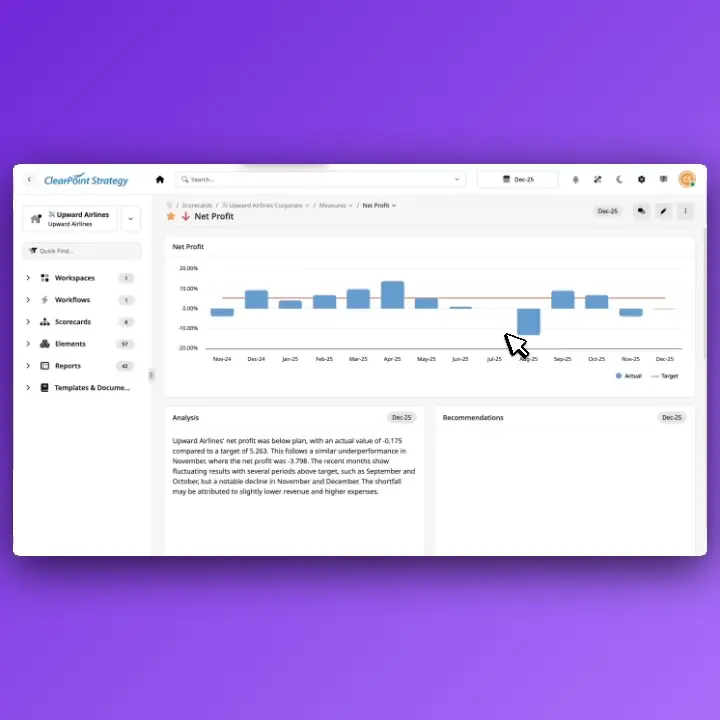
Mission, vision, goals and success measures as a starting draft, in the framework you use: Balanced Scorecard, OKRs, Hoshin Kanri, EOS, V2MOM, SWOT and more. You review every element before it is saved.
It spots initiatives likely to miss their deadline from past patterns and suggests a corrective action.
It writes the formula for a calculated series and suggests the evaluation logic.
Ask for the quarterly deck and ClearPoint AI builds the PowerPoint from live data.
Type “make this a Gantt chart” and the chart changes to match.
Rank departments, find your top and bottom performers, and spot conflicts between projects.
The assistant sits in the left navigation, ready to brainstorm, analyze, plan or act wherever you are.
Your administrators. For public sector, healthcare, education and regulated buyers, governance decides the purchase. Every rule lives in System Setup, not in user profiles.
A single toggle hides every AI feature, account-wide.
Surfaces only what each user may already see, and says so when it can’t answer.
With Scorecard Approvals, AI-written changes wait for an approver, tagged “AI generated.”
Administrators review AI conversations across users.
The AI audit log shows who asked and what changed, by display name.
Tone, response length, supportive or challenging, plus custom guidelines on every response.
Says when a request is outside its capabilities instead of reporting false success.
Answers grounded in the AI Knowledge Base cite the document they came from.
Customer data is not used to train or improve the AI models.
ClearPoint AI calls OpenAI and Anthropic models through closed API integrations, with personal information removed before any request.
TLS 1.2 or higher in transit, AES-256 at rest.
Every AI feature goes through security review and a data-flow assessment before it ships.
All of them. Your tier sets how much reasoning capability ClearPoint can draw on, not which features you get. Nobody picks a model: a quick status question runs light, a Strategy Brief reaches for the highest tier you hold.
Standard AI capability on every ClearPoint AI surface.
Adds a more capable tier for longer, multi-step reasoning.
Adds the highest tier, used automatically for the most demanding work.





Security, subprocessors and AI data handling live in the Trust Center.
Yes. One toggle in System Setup hides every AI feature account-wide. Administrators set AI preferences, not individual users, so behavior stays consistent, and they can review AI chat transcripts across users.
Yes. It surfaces only what each user already has permission to see, and tells them clearly when it can’t answer for that reason.
Yes. With Scorecard Approvals, an Enterprise feature, updates, edits, additions and deletions wait for an approver. Changes written by ClearPoint AI carry an “AI generated” tag, so approvers know where they came from.
Yes. Reply in plain English to any ClearPoint email carrying a PDF export. ClearPoint AI reads the attachment, answers your question and writes updates back into the scorecard. ClearBot in Microsoft Teams works the same way.
Yes. The ClearPoint MCP Server connects Claude, ChatGPT or Microsoft Copilot to your ClearPoint data over a secure, OAuth-authenticated connection. Your assistant reads your strategy and, where your permissions allow, writes back: measure data, custom fields, scorecard hierarchies and calculated series such as variance-to-target.
Yes. Upload documents to the AI Knowledge Base and ClearPoint AI answers from that context, citing the source of each answer.
Yes. Ask for the quarterly report and ClearPoint AI assembles it from live data, as a briefing book or a PowerPoint deck.
The Trust Center holds the current picture: SOC 2 Type 2 and TX-RAMP authorization, the maintained subprocessor list, and the AI data handling and training-data documentation.
Inside a live plan, ClearPoint AI builds scorecards from plain-English requests, writes performance analysis from your real numbers, recommends next steps you can turn into owned action items, and collects updates by email, Microsoft Teams or your own assistant over the MCP Server. Playbooks guide SWOT analyses, risk assessments and OKR builds. Read the AI strategic planning guide
Look for AI that does both: drafts the plan and keeps it current. ClearPoint AI drafts mission, vision, goals and success measures in the framework you use, then works inside the live plan: it respects each user’s permissions, cites its sources, writes audited updates back to the scorecard, and gives administrators a master switch and transcript oversight.
A strategic planning expert who knows your sector reviews your needs, loads your plan, your data or your use case into ClearPoint, then walks you through it.
Two short steps, then choose a slot on the calendar. No back-and-forth emails.
A strategic planning expert who works with organizations like yours reviews your request and asks what you want to see.
Your plan, measures or use case is loaded before the call, so the 30 minutes run on your organization. Nothing to share yet? They show you an organization like yours.


“This platform has created opportunities we never imagined. Prior to ClearPoint, we never had the data in a way individuals could value.”
 Octavius M.Assistant to the City Manager
“This system keeps you finding operational efficiencies. Several of these opportunities have resulted in millions of dollars in savings!”
 Brandie H.Director of Strategy
“Before ClearPoint, we were drowning in spreadsheets and PowerPoints.”
 Darren E.Director of Finance
Explore at your own pace, then book a demo when you're ready. No form, no call.


Don't want to schedule a demo yet? No worries. Just enter your contact info below to get instant access to an interactive tour of ClearPoint.


.webp)